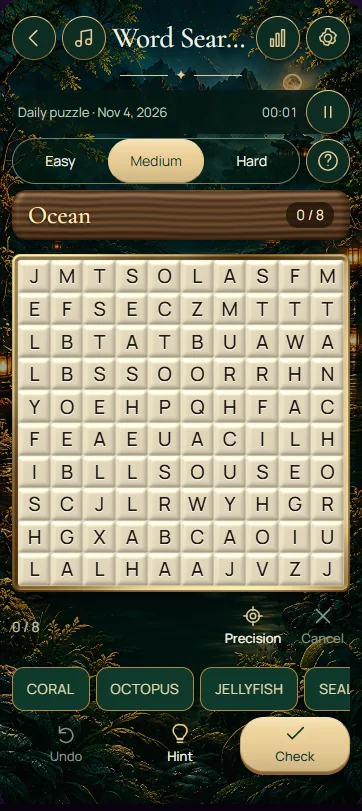
Find all eight words from the displayed list by selecting each word's first and last letters along one straight line. Words can share letters, and the permitted directions expand with difficulty. Check the complete spelling before selecting a path: a matching beginning alone is not enough.
Select words with a pointer, touch or keyboard
Drag from one endpoint to the other, or tap the first letter and then the last. A recognised word is marked on the grid and crossed off the list. If you are using a keyboard, focus a starting letter and press Enter, move with the arrow keys, then press Enter on the endpoint. Escape cancels a pending selection.
Keep the path horizontal, vertical or diagonal without bends or gaps. Selecting a word in reverse order also works. Highlighted letters may belong to another target, so do not exclude already marked areas from your search. Each listed target occurs once in the puzzle.
Match your search to the difficulty setting
Easy uses a 9 × 9 grid with words placed to the right or down. Medium uses a 10 × 10 grid and also permits the two downward diagonals. Hard uses an 11 × 11 grid with all eight directions, including reversed horizontal, vertical and diagonal placements. Read the list first, then include the orientations allowed by your setting.
A larger grid gives you more cells to inspect, but a distinctive letter pair can still make a long target quick to spot. For a word such as COMET, locate a C and check whether its neighbour in a permitted direction is O. Reject that direction immediately if the second letter fails, rather than reading a whole unrelated line.
Four practical ways to find the elusive word
For example, a down-right COMET beginning at row 2, column 3 continues through row 3, column 4 to row 6, column 7. Every step changes both coordinates by one. If any letter disagrees with C–O–M–E–T, reject the path even when its first and last letters look correct.
- Sweep rows in a consistent order so you can distinguish checked areas from places you have merely glanced at.
- Use a distinctive pair inside the target when its first letter appears too often to be helpful.
- Check that a candidate direction has enough remaining cells to fit the entire word.
- Include highlighted cells and border areas when searching for your final target, and verify both endpoints carefully.
Frequently asked questions
Can words run backwards or diagonally?
Yes, depending on difficulty. Easy places words to the right or down, Medium adds downward diagonals, and Hard uses all eight straight directions. You can select a discovered word from either endpoint. The path itself must remain straight; a sequence that turns a corner is not a valid target.
Can two words share the same letter?
Yes. Targets may cross or overlap where their letters agree. Finding one word does not make its cells unavailable to the others. Keep searching through highlighted areas, but verify each target independently as a complete straight sequence rather than turning from one found word onto another.
What should I check if a selection is not recognised?
Compare every letter with the word list and make sure the path is straight. Then check that the selected endpoints include exactly the target, without an extra neighbouring cell. On a small screen, tapping the two endpoints separately can make a precise selection easier than dragging across the grid.