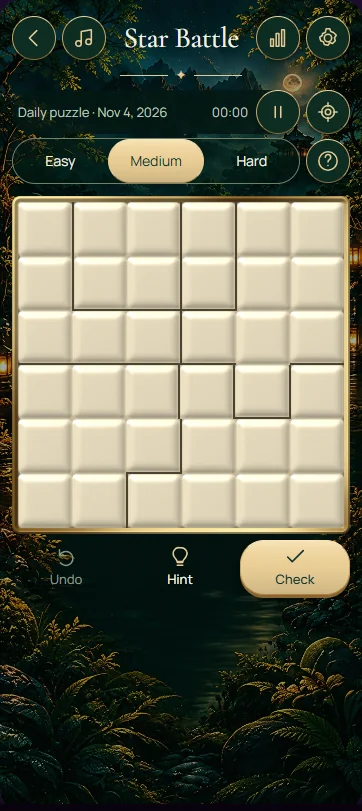
In this one-star Star Battle, place exactly one star in each row, column and outlined region. Stars cannot touch horizontally, vertically or diagonally. The 6 × 6 board therefore needs six stars in total, with every placement satisfying the line counts, region counts and neighbouring-cell restriction simultaneously.
Count rows, columns and regions separately
Each star belongs to three counting groups: its row, its column and its outlined region. Placing a star completes all three groups, so every other cell in those groups becomes unavailable for another star. Irregular regions do not behave like Sudoku boxes; follow their actual boundaries rather than assuming a rectangular shape.
The touching rule adds a separate restriction. Every cell immediately surrounding a star, including the four diagonal neighbours, must remain empty. Two stars in different rows, columns and regions can still be invalid if they meet at a corner. This version uses one star per group; techniques for puzzles requiring two or more stars need to be adapted before applying them here.
Mark possibilities and confirmed exclusions
Select a cell repeatedly to cycle through a star, an exclusion mark and an unmarked cell. Use the exclusion mark for positions you have ruled out, especially around a confirmed star. A blank cell should mean that you have not decided yet, rather than hiding whether you checked it.
Check solution reports whether the current star arrangement meets the board's constraints. Hint reveals a move from the stored solution, and Start over resets the current board. Changing difficulty also resets the board's state. Choose the level before beginning a careful solve so an accidental level change does not interrupt the deductions you were working through.
Work through one confirmed star
Suppose you have logically confirmed a star at row 2, column 3. Every other cell in row 2 is excluded, as is every other cell in column 3. Also exclude the remaining cells of the region containing that star. Those exclusions follow from the one-star counts, regardless of how far away a cell lies.
Now apply the touching rule. Positions in rows 1 through 3 and columns 2 through 4 surround the star; every one except the star itself must be empty. Some were already excluded by the row or column rule, but the diagonal positions add new information. Revisit the affected regions: if a region has only one available cell left, its star is forced there.
Use restricted regions before guessing positions
Look for a region whose remaining possible star positions all lie in one row. Wherever that region's star goes, it will also be the single star in that row. You can therefore exclude cells elsewhere in that row outside the region. The same reasoning works when all candidates lie in one column.
Another useful restriction comes from a small cluster of candidate positions. A cell that touches every possible star position in a region cannot itself hold a star: it would touch that region's star whichever candidate wins. Confirm that you have found every remaining candidate before using this deduction. Missing one distant candidate can make an attractive exclusion invalid.
- After placing a star, complete the exclusions for its row, column and entire region.
- Mark all neighbouring cells, including diagonal neighbours, before scanning for the next star.
- Find regions with only one available cell and verify that cell against nearby stars.
- Use regions confined to one row or column to exclude other cells along that line.
- Count the final stars in every group separately instead of checking only the total number.
Check the finished arrangement
Six stars alone do not prove success. A completed arrangement might still leave one region empty and another with two stars. Review each row, then each column, then each outlined region. Finally inspect diagonal pairs, which are easy to miss after concentrating on the counts. These checks explain why a nearly finished board needs another move.
Frequently asked questions
Can stars touch if they belong to different regions?
No. The non-touching rule applies across every region boundary, including diagonal contact. A pair can satisfy the one-star counts for its rows, columns and regions while still being illegal because the stars touch. After placing a star, exclude all immediately neighbouring cells before searching for another placement.
Does this puzzle need one star or two stars per region?
This board requires one star in every row, column and outlined region. Its six rows therefore give a total of six stars. Other Star Battle puzzles may require two or more stars per group, but those are different settings. Follow the count stated for the board you are solving.
Can I rule out a cell before knowing exactly where a star goes?
Yes. If all possible star positions in a region lie in one row, the region must supply that row's star somewhere. Other cells in that row are therefore excluded. You still have to determine the star's exact position, but the exclusion can unlock a different region or column.