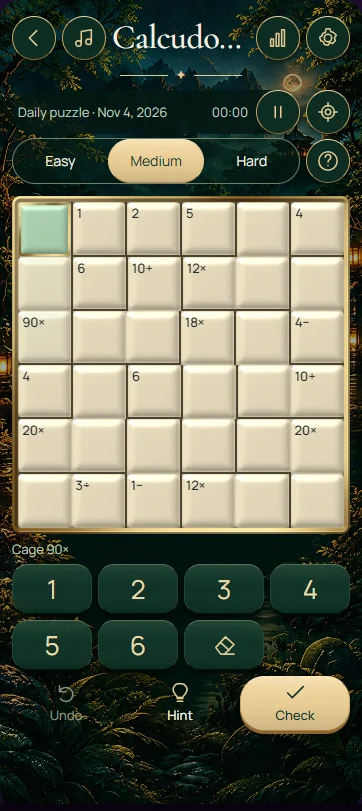
Fill this 5 × 5 Calcudoku with digits 1–5 so every row and column contains each digit once, while every outlined cage reaches its labelled target using the shown operation. Solve the arithmetic and the position constraints together. The cage borders replace Sudoku's boxes; there is no separate 3 × 3 box rule.
Read each cage before entering a number
Darker borders group the cells of a cage. Its small label shows a target and an operation: addition, multiplication, subtraction or division. A single-cell cage displays its required value. Addition and multiplication combine every digit in the cage, while subtraction and division use two cells and can be read in either order.
Select a cell, then use the number buttons or keyboard to enter 1–5. Notes records candidates rather than a final answer; switch it off before confirming a number. Arrow keys move between cells, and the clear button or Backspace/Delete erases an editable entry. Any printed starting digits stay fixed.
Use arithmetic to restrict the candidates
Consider a two-cell cage labelled 10×. With digits limited to 1–5, its cells must contain 2 and 5: the alternative factor pair 1 and 10 uses a number outside the board's range. If one of the cells has a confirmed 2 elsewhere in its row, that cell must be 5 and the other becomes 2.
For a two-cell 2÷ cage, the possible unordered pairs are 1/2 and 2/4. The larger number divided by the smaller must equal 2; their visual order does not matter. A 2− cage instead requires a difference of 2, allowing pairs 1/3, 2/4 or 3/5 before other row and column restrictions are applied.
Four checks that connect cages to the grid
A cage does not automatically prohibit repeated digits. Repetition is possible when matching digits occupy different rows and columns and still satisfy the cage operation. However, two cage cells in the same row or column must differ. Check the shape as well as the target before listing combinations.
- Fill single-cell cages first, then remove those digits from candidates in their rows and columns.
- Prioritise restrictive products and quotients before cages with many possible combinations.
- Separate a valid combination from its order; crossing row and column constraints settle the positions.
- After each placement, recheck both the cage calculation and the missing digits in its row and column.
Frequently asked questions
Can a digit repeat within a Calcudoku cage?
Yes, when the repeated digits lie in different rows and columns and satisfy the cage's arithmetic. A cage is not automatically an all-different region. The row and column rules still apply, so two cells sharing either one cannot hold the same digit even when the target calculation would work.
Which way do I read subtraction and division cages?
These cages have two cells and are evaluated in either order. For subtraction, the larger digit minus the smaller must equal the target. For division, the larger divided by the smaller must equal the target. A cell's position on the screen does not determine which value comes first.
How is Calcudoku different from Sudoku?
Both puzzles prevent repeated digits in each row and column. This Calcudoku uses a 5 × 5 board with digits 1–5 and arithmetic cages, while classic Sudoku uses 1–9 and 3 × 3 boxes. In Calcudoku, the target and operation of each cage provide the extra constraints.