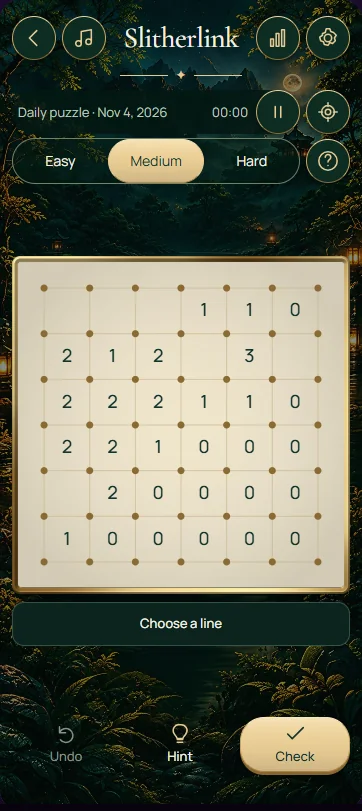
Slitherlink asks you to draw one continuous closed loop along the edges between dots. Each numbered cell tells you exactly how many of its four sides belong to the loop; blank cells have no local count, but every part of the drawing must still obey the loop rules.
Read the clues and the dots together
A 0 means none of the four edges around that cell can be used. A 1 needs one edge, a 2 needs two, and a 3 needs three. The number counts the sides of that particular cell, not every segment in the surrounding area.
At a dot used by the loop, exactly two selected edges must meet. One edge would leave an open end; three would create a branch, and four would create a crossing. Unused dots are allowed. When two edges are already present at a dot, exclude every other edge touching it.
Make an initial deduction
Start with a 0 and mark all four surrounding edges as excluded. If a neighbouring 3 shares one of those excluded edges, its other three sides must be lines. You have now used a clue relationship to place several segments without choosing an arbitrary direction.
Check the dots at the ends of those segments next. If a dot has one line and only one remaining possible edge, that edge must continue the loop. Alternate between clue counts and dot connections; each type of deduction can create opportunities for the other.
Keep the whole loop connected
Matching every printed number is necessary, but separate small loops are not a valid solution. Before joining two ends, consider whether the connection would close a loop while leaving required segments elsewhere. A completed loop must include all selected segments in one connected circuit.
Do not treat a blank clue cell as a zero. Any of its sides may be used when the surrounding connections require them. Similarly, the loop can pass around a numbered cell without enclosing it completely; the clue specifies used edges, not whether the cell lies inside the finished shape.
Use the board controls
Tap or click an edge to cycle through a line, an excluded ×, and a blank edge. Right-click an edge to mark it excluded. With a keyboard, Tab moves between edge controls and Enter or Space activates the focused edge. Exclusion marks help distinguish a proved impossibility from an undecided edge.
Tips for your next move
- Begin with zeros and neighbouring clues whose remaining edge counts become forced.
- After drawing a line, check both endpoint dots for a forced continuation or exclusion.
- When a clue already has enough lines, exclude its unused sides.
- Before closing a circuit, check that no required line would remain outside it.
Frequently asked questions
Do all dots have to belong to the Slitherlink loop?
No. A dot can remain completely unused. If the loop does use a dot, exactly two selected edges must meet there. This prevents open ends, branches, and crossings. Focus on satisfying the numbered cells while keeping all selected segments connected into one closed circuit.
What does an empty Slitherlink cell mean?
An empty cell has no clue about how many of its sides belong to the loop. It is different from a cell marked 0, whose four sides must all be excluded. You can use edges around empty cells whenever the neighbouring clues and the continuous-loop requirement permit them.
Why is a board with correct clue counts still unfinished?
The edge counts are only one part of the puzzle. Your drawing must also form a single connected loop, with exactly two lines at every used dot. Look for an open end, a branching junction, or separate closed loops. Any of those can remain even when every number has the right count.