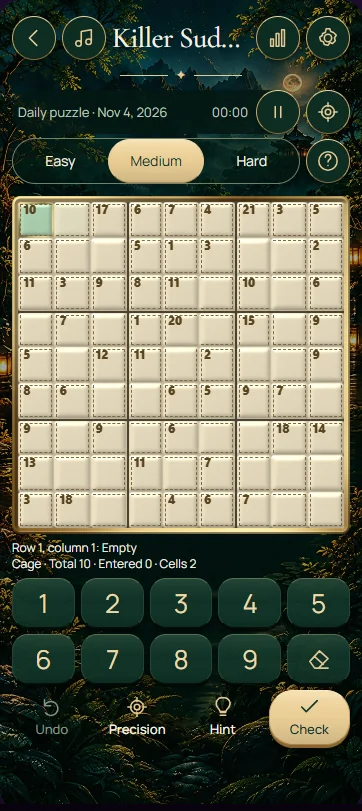
This Killer Sudoku uses a 6 × 6 grid: place 1–6 once in each row, column and 2 × 3 box, while matching every cage total without repeating a digit inside a cage. Combine arithmetic with the crossing Sudoku constraints. A correct sum alone does not guarantee a correct placement.
Separate boxes from sum cages
The six Sudoku boxes each cover two rows and three columns. Sum cages are a different grouping, identified by their outlines and small totals. A cage may cross a box boundary, but its cells still obey their original row, column and box restrictions. Keep both kinds of grouping in mind when checking an entry.
Each cage total equals the sum of every digit in that cage. Digits cannot repeat anywhere within one cage, even if two cage cells occupy different rows, columns and boxes. A single-cell cage is immediately determined by its total. Larger cages first give a set of possible combinations; other constraints may be needed to decide their order.
Use the controls to support a checked deduction
Select an editable cell and choose a digit from 1 through 6 on the keypad. The erase control clears a value you want to reconsider. Before entering a cage combination, check each proposed digit against the row, column and box containing that particular cell. Swapping two otherwise correct cage digits can change whether the placement is legal.
Hint reveals a move from the stored solution. Try to connect that value to its cage sum and crossing units before continuing. Check solution offers feedback on your entries, and Start over restores the current board's initial state. Keep your own candidate reasoning clear rather than relying on repeated checks to choose between unproven guesses.
Work through a restrictive two-cell cage
A two-cell cage totalling 11 must contain 5 and 6 on this board. The allowed digits stop at 6, so alternatives such as 4 and 7 are unavailable. The cage cannot use repeated values either. This identifies the pair, but does not yet tell you which cell contains 5.
Call the cells A and B. If A's row already contains 6, A cannot be 6 and must therefore be 5. B becomes 6. Check both cells' columns and boxes before confirming the entries. The same reasoning begins with a two-cell total of 3, which can contain only 1 and 2. Treat the combination and its placement as two separate deductions.
Use the total of a complete unit
The digits 1 through 6 add to 21, so every completed row, column and box on this board totals 21. Suppose a row contains several complete cages whose totals together equal 15, plus one remaining cell. Those cages account for all other cells in the row, so the remaining cell must contain 21 minus 15, which is 6.
Only subtract cage totals when the counted cages lie entirely within the unit you are analysing. If a cage extends into another row, its full total includes an outside cell and cannot simply be subtracted from the first row. Also avoid counting overlapping information twice. The familiar 45-total shortcut for nine-digit Sudoku becomes a 21-total shortcut in this six-digit version.
- Begin with single-cell cages and restrictive two-cell totals such as 3 or 11.
- List distinct-digit combinations before attempting to assign their order within a cage.
- Use row, column and 2 × 3 box conflicts to eliminate candidate orders.
- Subtract complete contained cage totals from 21 when exactly one unit cell remains.
- Review cage sums and cage-wide nonrepetition alongside the three standard Sudoku constraints.
Check a finished grid in a useful order
First verify that every row, column and box contains 1–6 once. Then add each cage and compare its result with the printed total. Finally check that no digit repeats within any cage, including cages that cross box boundaries. These are separate requirements: a cage can add correctly while containing an illegal repeat, and a repeat-free cage can still have the wrong sum.
Frequently asked questions
Does this Killer Sudoku use 1–9 and the 45 rule?
No. This board uses 1–6 in a 6 × 6 grid, with boxes two rows high and three columns wide. Each completed row, column and box therefore sums to 21. Many other Killer Sudoku puzzles use 1–9 and total 45, so check the board size before applying a shortcut.
Can a digit repeat inside a cage crossing two boxes?
No. Cage-wide nonrepetition applies even when its cells occupy different boxes, rows or columns. Crossing a box boundary does not relax that rule. When you list combinations for a cage total, use distinct digits only, then check whether their proposed positions satisfy the ordinary Sudoku constraints as well.
Does knowing a cage's combination tell me the cell order?
Usually not. A two-cell total of 11 identifies 5 and 6 here, but either order may initially seem possible. Inspect the rows, columns and boxes crossing those two cells to eliminate one order. If neither order is ruled out yet, retain the pair and work on another deduction.