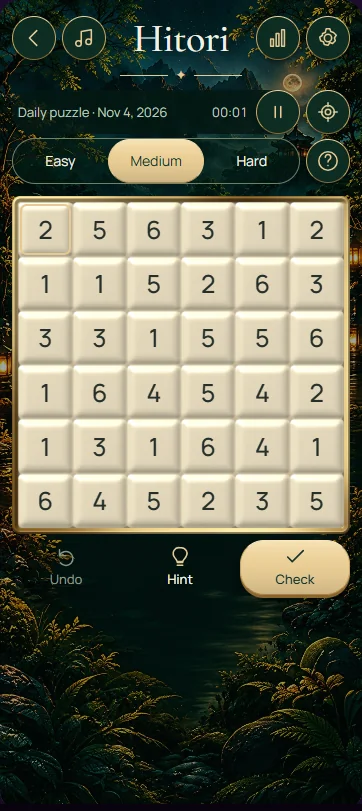
Hitori is a shading puzzle: remove repeated numbers by shading cells while keeping the remaining white cells connected. On this 6 × 6 board, no unshaded number may repeat within a row or column, and shaded cells must not share a side. Every decision has to satisfy all three rules together.
Read the numbers and apply all three rules
The printed numbers are labels to compare, not totals to add. You shade some numbers so each row and column contains at most one unshaded copy of any value. A row does not need to retain every possible number. Two shaded cells may meet diagonally, but they may not share a horizontal or vertical edge.
The white cells must form one continuous area using horizontal and vertical steps. A diagonal contact alone does not join two white areas. Before shading a cell in a narrow passage, check whether the remaining white cells would still connect. Removing a duplicate is necessary, but a locally convenient removal can still violate this global rule.
Operate the board deliberately
Select a numbered cell repeatedly to cycle through shaded, unshaded and unmarked states. The printed number remains visible so you can continue comparing its row and column. Classify every cell when finishing the board, including the numbers you intend to keep white. Start over resets your progress on the current puzzle.
Hint reveals a move from the puzzle's stored solution. If you use it, inspect the surrounding duplicates and connections to work out why that move helps. Check solution provides feedback on your entries. Treat feedback as an aid to review, and make your own final checks of duplicate numbers, adjacent shaded cells and white-area connectivity.
Work through the sandwich deduction
Imagine three consecutive cells in a row reading 6, 2, 6. The two sixes cannot both remain white, because their values would repeat in that row. At least one of them must therefore be shaded. Now suppose you shaded the middle 2. Both neighbouring sixes would have to remain white, because shaded cells cannot share a side.
That supposition contradicts the duplicate rule, so the middle 2 must stay white. This conclusion does not yet tell you which 6 to shade. Check their columns and the surrounding white connections to decide that separately. If another 2 occurs elsewhere in the same row, that other 2 must be shaded because the middle one is already confirmed white.
Keep local deductions connected to the whole board
After confirming a shaded cell, keep every edge-sharing neighbour white. Each newly confirmed white value can then force matching numbers elsewhere in its row and column to be shaded. Follow this chain carefully and recheck connectivity whenever the shaded pattern approaches a corner, border or narrow white passage.
When two duplicate cells remain undecided, retain both possibilities mentally and inspect another area. Do not choose one simply to make the row look tidy. A column deduction may settle the pair later. Remember that a number unique in its row can still repeat in its column; check both directions before deciding it is safe to keep.
- Look for equal numbers separated by one cell; the middle cell must remain white.
- After shading a cell, keep its horizontal and vertical neighbours white.
- Use confirmed white numbers to eliminate their duplicates elsewhere in the same row or column.
- Check that shading never cuts the white area into separate edge-connected pieces.
- Review borders and corners carefully, where a small number of shaded cells can isolate white cells.
Frequently asked questions
Can shaded cells touch diagonally in Hitori?
Yes. The restriction applies to cells sharing a horizontal or vertical edge, so a diagonal contact is allowed. However, that diagonal pattern can still affect the white area's connectivity. Check that all remaining white cells can reach one another through side-sharing white cells before accepting the shading.
Must every number appear once in each row?
No. Hitori requires the unshaded numbers within a row or column to be different; it does not require every possible value to remain. Shading can remove a value from a row completely. The other two rules, nonadjacent shaded cells and connected white cells, still apply to every removal.
Why is the middle cell between matching numbers always white?
If the middle cell were shaded, its two side-sharing neighbours would both have to remain white. When those neighbours contain the same number in one row or column, that creates a forbidden repetition. Keeping the middle cell white avoids this contradiction, although another deduction must decide the matching pair.